This method will be very useful if you want to validate the html passed from input string do not have any script block.
Example HTML have script block :
<div> this is the information </div><script>alert('Your computer have security vulnerable');</script>
Example ASPX Code :
Note : This html using Editor Controller in AjaxToolkit library
 <asp:Content ID="Content1" ContentPlaceHolderID="HeadContent" runat="server">
 </asp:Content>
 <asp:Content ID="Content2" ContentPlaceHolderID="MainContent" runat="server">
   <ajaxToolkit:ToolkitScriptManager ID="ToolkitScriptManager1" runat="server">
   </ajaxToolkit:ToolkitScriptManager>
   Input Text :
   <cc1:Editor ID="Editor1" runat="server" />
   <br />
   <asp:Button ID="Button1" runat="server" Text="Save" onclick="Button1_Click" />
   <br />
   <asp:Literal ID="Literal1" runat="server"></asp:Literal>
 </asp:Content>
Code Behind :
   protected void Page_Load(object sender, EventArgs e)
     {
     }
     protected void Button1_Click(object sender, EventArgs e)
     {
       string inputHTML = Editor1.Content;
       Literal1.Text = RemoveScripts(inputHTML);
     }
     /// <summary>
     /// Regular expression match for the scripts.
     /// </summary>
     private Regex _RegExRemoveScripts;
     /// <summary>
     /// Regular expression match for the scripts.
     /// </summary>
     private Regex RegExRemoveScripts
     {
       get
       {
         // Expression groups: none
         return _RegExRemoveScripts ?? (_RegExRemoveScripts = GetRegex(@"<script[ >](?:[^<]|<(?!/script))*</script>",
           RegexOptions.Compiled | RegexOptions.IgnoreCase));
       }
     }
     /// <summary>
     /// Gets the regular expression specified by a matching pattern, optionally specifying processing options.
     /// </summary>
     /// <param name="pattern">Pattern to match</param>
     /// <param name="options">Processing options</param>
     private Regex GetRegex(string pattern, RegexOptions options)
     {
       return CreateRegex(pattern, options);
     }
     /// <summary>
     /// Creates a new regular expression
     /// </summary>
     /// <param name="pattern">Pattern to match</param>
     /// <param name="options">Processing options</param>
     private Regex CreateRegex(string pattern, RegexOptions options)
     {
       return new Regex(pattern, EnsureCorrectOptions(options));
     }
     /// <summary>
     /// Adds CultureInvariant option when there is ignore case to ensure correct behavior in Turkish culture.
     /// </summary>
     /// <param name="options">Options to be modified</param>
     private RegexOptions EnsureCorrectOptions(RegexOptions options)
     {
       if (options.HasFlag(RegexOptions.IgnoreCase) && !options.HasFlag(RegexOptions.CultureInvariant))
       {
         // Add CultureInvariant option when there is ignore case to ensure correct behavior in Turkish culture
         options |= RegexOptions.CultureInvariant;
       }
       return options;
     }
     /// <summary>
     /// Removes the scripts from the given HTML text.
     /// </summary>
     /// <param name="htmlText">HTML text to process</param>
     public string RemoveScripts(string htmlText)
     {
       // Remove all script blocks
       htmlText = RegExRemoveScripts.Replace(htmlText, "");
       return htmlText;
     }
How to use ?
- Copy paste the above code in your code behind
- Try call method RemoveScript(string htmlCode)
Output :
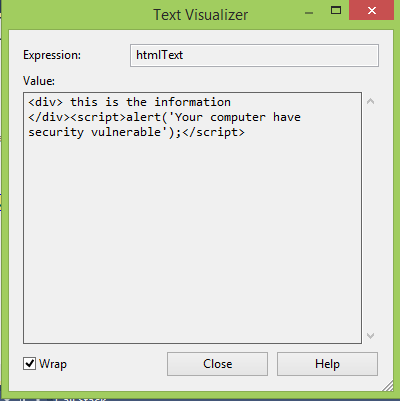
After Filter :

Hopefully this example can help someone.
NOTE : – If You have Found this post Helpful, I will appreciate if you can Share it on Facebook, Twitter and Other Social Media Sites. Thanks =)


0 comments:
Post a Comment